Combination
-
Host Raspberry Pi Raspberry Pi 5
8GBCredit-card-sized single-board computer used for education, prototyping and embedded projects. AI
-
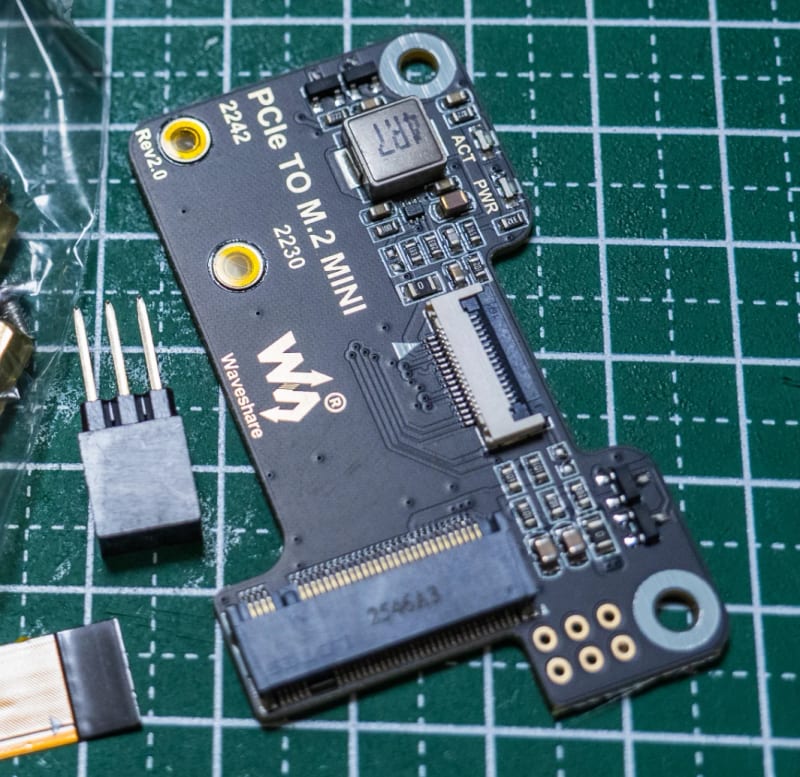 M.2 adapters / HATs
Waveshare PCIe TO M.2 MINI
M.2 adapters / HATs
Waveshare PCIe TO M.2 MINI
Adapter board that connects M.2 2230/2242 SSDs to the PCIe port of a Raspberry Pi 5. AI
-
NVMe SSDs
KIOXIA EG6
1TB M.2 2230FW11600106NVMe solid-state drive used as internal storage for computers. AI
Conditions
| OS | Raspberry Pi OS (Debian GNU/Linux 13 trixie) |
|---|---|
| Kernel / EEPROM / driver | Kernel 6.18.50+rpt-rpi-2712 / EEPROM 2026-05-26 |
| Settings | dtparam=pciex1 dtparam=pciex1_gen=2 |
Notes
PCIe generation (Gen) set to Gen2, recognized from the first boot. The SSD is a used Dell OEM unit; the original Windows partition was deleted and it was reformatted as ext4 for use. Verified findings: ① Recognized on every boot; after repeating restarts 10 times, it was recognized and mounted all 10 times (Gen2). ② With 4GB of write/read operations, checksums matched. ③ During approximately 11 minutes of monitoring, no NVMe or filesystem errors occurred. SSD diagnostics (SMART) showed usage at 2% and zero media errors. With the same combination set to Gen3, recognition at boot was unstable (see another rig log for reference). Power source is a mobile battery pack (approximately 5V 3A). After the load test with Gen2, a record indicating voltage drop remained (vcgencmd get_throttled = 0x50000). Note: This motherboard is for 2230/2242 form factors and cannot accommodate 2280 SSDs. The FPC cable must be inserted with the cable's ▲ and the board's ▲ aligned on the same side (reversed insertion will not work).
Machine translation / Original
PCIe の世代(Gen)を Gen2 にした設定で、初回の起動から認識した。SSD は Dell 純正(OEM)の中古で、元の Windows のパーティションを消して ext4 で作り直して使っている。 確認した内容: ①起動のたびに認識されるか、再起動を10回繰り返して10回とも認識・マウントできた(Gen2)。②4GBの書き込み・読み戻しで、チェックサムが一致した。③約11分間の監視で、NVMe やファイルシステムのエラーはなかった。SSD の診断(SMART)では、使用率 2%、メディアエラー 0 だった。 同じ組み合わせで Gen3 にすると、起動時の認識が不安定だった(別のリグログを参照)。 電源はモバイルバッテリー(約 5V3A)。Gen2 での負荷テストのあと、電圧低下を示す記録(vcgencmd get_throttled = 0x50000)が残っていた。 なお、この基板は 2230/2242 用で、2280 の SSD は固定できない。FPC ケーブルは、ケーブルの▲と基板の▲を同じ側に合わせて挿す(逆だと動かない)。
Sources
- CompatRigs user Rig Log #2273(2026-10-20)
- User reports (external) Waveshare Wiki: PCIe TO M.2 MINI (2230/2242, Gen2/Gen3) (checked 2026-10-20)
Reported: 2026-10-20 / CC-BY-4.0
